
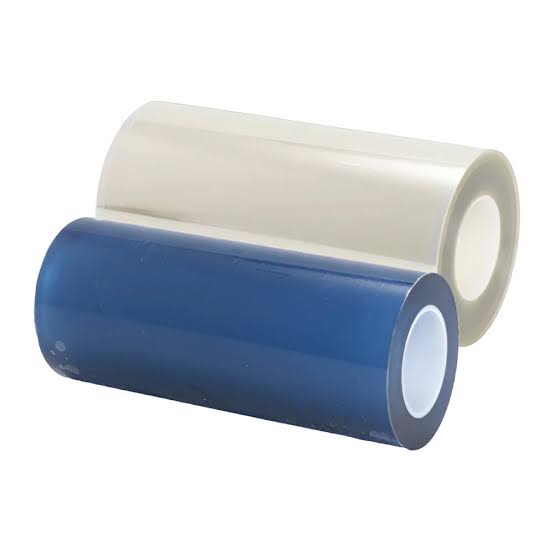
Most UV DTF crystal-label failures come down to one of four stages — the A-film print and cure, the B-film lamination, the transfer and application, or surface preparation — and the fastest fix is to find which stage is producing the symptom before you swap materials. A film is the printable release layer and B film is the laminating carrier, so a "bad film" problem is usually a mismatch between the two, or a lamination and application fault, not a single defective roll. This guide runs the four stages in order, then shows how a matched A+B system removes most of the guesswork.
Know the four stages before you change anything
A crystal-label decal moves through four steps, and each has its own failure signature: (1) print and UV-cure on the A film, (2) B-film lamination over the cured graphic, (3) cutting and transfer to the substrate, and (4) final surface contact and bond. A transfer failure is rarely explained by one material alone, and replacing the film immediately can hide the real cause and create more waste (YXCDTF). Identify the stage, then change one variable at a time.
Stage 1 — A-film print and cure: when the decal won't release
A film is the printable, release layer. The design is printed onto its coated side and UV-cured before the B film is applied. Two failures dominate at this stage.
Undercured ink smears or stays tacky
If the ink is still tacky, smears on contact, or transfers unevenly to the B film, the most likely cause is incomplete UV cure — wrong lamp intensity, an ink-film system that is not matched, or running too fast. Confirm the ink is matched to the A film and let the cure finish before lamination (Joto Imaging Supplies).
Printing on the wrong side or the wrong base
The ink must land on the coated side of the A film; printing on the back produces a graphic that will not release cleanly. The base also matters — a paper-based (white thick) A film and a clear-based (double clear) A film behave differently, and choosing the wrong base for the job is a selection error, not a film defect. See our A film vs B film buyer's guide and the white thick vs double clear base comparison.
Stage 2 — B-film lamination: bubbles, residue and misalignment
B film is the transfer and laminating carrier pressed over the cured graphic. Lamination faults show up immediately.
Air bubbles between A and B
Air trapped between the A film and B film leaves visible bubbles in the finished label. The usual causes are lamination temperature or pressure that is too low, a contaminated roller, or incorrect tension. Adjust the laminator within the film supplier's recommended window and keep the roller clean rather than raising heat as a default (Megajet).
Glue residue or over-lamination
Too much heat or dwell time can push adhesive past the graphic edge (glue residue) or distort the image. Stay within the supplier's lamination window instead of increasing heat to "fix" a bubble problem.
Stage 3 — Transfer and application: lifting, peeling and silvering
After lamination, the decal is transferred to the substrate. This is where most surface problems appear.
Surface contamination
Bubbles, silvering and poor adhesion on the finished item are most often contamination — oils, moisture, dust or cleaning residue sitting between the adhesive and the surface (Pressing Images). Clean and dry the surface, then apply with even pressure.
Peel angle and speed
Peeling the carrier film too fast or at too steep an angle lifts fresh edges. Peel low and slow. Lifting that begins days later usually points back to surface preparation or an adhesive-and-substrate mismatch rather than the film alone (YXCDTF).
Stage 4 — The finished bond
UV DTF crystal labels are cold-applied — no heat press and no DTF hot-melt powder. If a label looks correct but lifts over time, review the substrate (curved, low-energy or textured surfaces behave differently) and the adhesive system, and confirm the A and B film are a matched pair from one system rather than mixed rolls from different suppliers.
A diagnostic order of operations
Run these in order and change one variable at a time:
| Step | Symptom | First thing to check | Most likely cause |
|---|---|---|---|
| 1 | Ink smears or stays tacky | UV lamp power and speed | Incomplete cure or ink-film mismatch |
| 2 | Decal won't release from A film | Printed side and A film base | Wrong side or wrong base |
| 3 | Bubbles after lamination | Laminator temp/pressure and roller | Air trapped, low pressure, dirty roller |
| 4 | Glue residue at the edges | Lamination heat and dwell time | Over-lamination |
| 5 | Lifting at application | Peel angle and speed | Carrier peeled too fast or too steep |
| 6 | Lifting or silvering days later | Surface prep and adhesive match | Contamination or adhesive mismatch |
How a matched A+B system removes most variables
Most "bad film" problems are mismatches, not defects. Buying A film, B film and ink as a matched system — or a pre-matched A+B kit — removes the biggest unknowns. ChromaBind carries UV DTF AB film as A film (A3 sheets in white thick or double clear base; 31/43/61 cm rolls in paper or clear base), B film (31 cm × 50 m and 31/44/61 cm × 100 m rolls), and matched A+B kits, so you can quote the exact component and format instead of a generic "AB film". For the consumables side, see UV DTF film and ink pairing and the UV DTF ink buyer's guide.
What to confirm with your supplier before switching film
- A film base and format: paper-based (white thick) or clear-based (double clear), sheets or rolls, and width.
- B film length: 50 m or 100 m, matched to your printer width.
- Ink-to-film compatibility for your UV ink set.
- Packing reference and HS reference (3920620000 as a quote reference; final classification remains the importer's or broker's responsibility).
- Documentation status for the selected product and shipment.
If a failure points back to a material, request a quote with the symptom, your A film / B film / ink setup, and your laminator settings. A supplier that can read those back and suggest one specific change is the one worth keeping.
References
- YXCDTF, "UV DTF AB Film Troubleshooting: 8 Transfer Failures and What Actually Causes Them" — https://yxcdtf.com/uv-dtf-ab-film-troubleshooting-8-transfer-failures-and-what-actually-causes-them/
- YXCDTF, "Why Does UV DTF Film Lift After Application?" — https://yxcdtf.com/why-does-uv-dtf-film-lift-after-application-you-may-be-using-the-wrong-adhesive-system/
- Megajet, "UV DTF AB Film Lamination: Optimal Temperature, Pressure & Bubble Fixes" — https://mymegajet.com/blog/uv-dtf-ab-film-laminating-temperature-pressure/
- Pressing Images, "UV DTF Troubleshooting: Why Your Decal Is Bubbling, Lifting, or Not Sticking" — https://pressingimages.com/blogs/news/uv-dtf-troubleshooting-bubbling-lifting
- Joto Imaging Supplies, "UV DTF Curing and Lamination: Common Issues and Fixes" — https://jotoimagingsupplies.com/blogs/blogs/uv-dtf-curing-and-lamination-common-issues-and-fixes